
Getting Started
Enable Vimotia Shoppable Video in Shopify Online Store 2.0 themes (VMT)
Shopify has announced one of their biggest updates, Online store theme 2.0. With online store 2.0 themes, you can easily enable the “Vimotia Core Snippet” from Vimotia Shoppable Video App using app blocks.
The “Vimotia Core Snippet” is used to speed up the loading speed of Vimotia Shoppable Video widgets include video gallery and different type of video play buttons. This should always be enabled, so the App can load faster and has less impact on page loading speed.
Here are the steps to enable it.
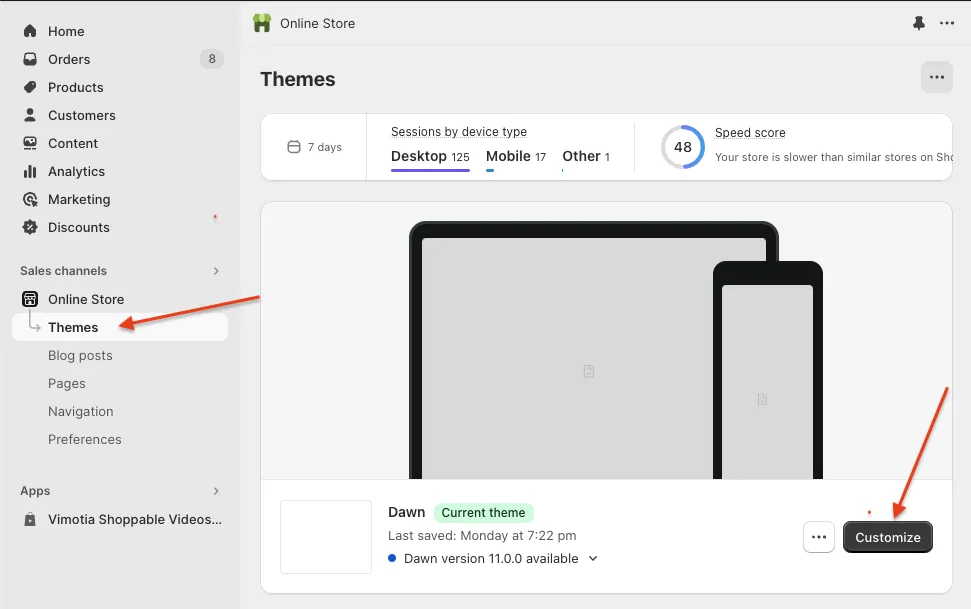
- Go to Shopify store admin >> Click “Themes” under “Online Store” >> click “Customize” button
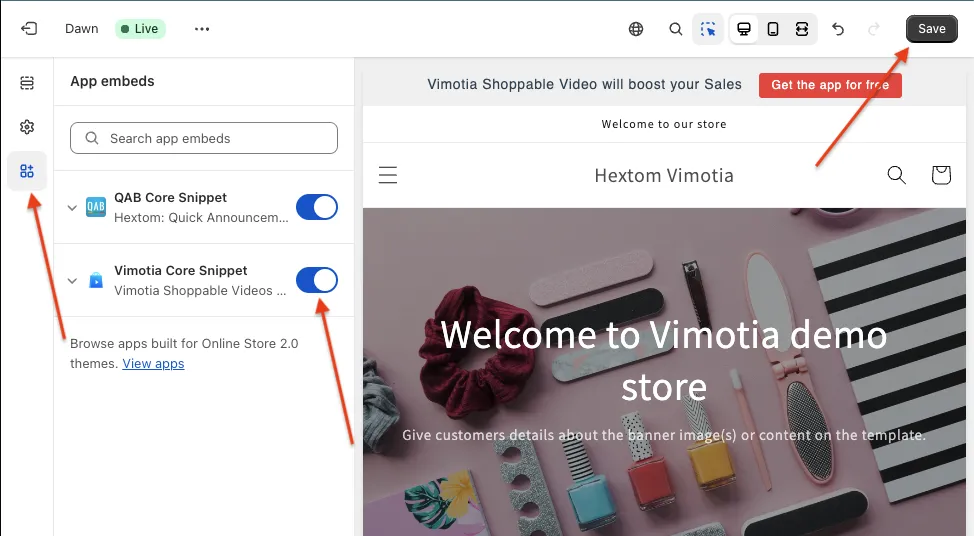
- Click “App embeds” button at the left panel >> enable the “Vimotia Core Snippet” >> click “Save” button at the top right corner
All set, the Vimotia Core Snippet is fully enabled, and can display shoppable videos or galleries and increase conversion for your website.
If there are any questions, please reach out to help@hextom.com where we can help you further.
Was this article helpful?
Your feedback helps us improve our docs.
Thanks for the feedback!