
Manual Translation
How to Generate and Save an AI Translation from the Manual Translation Tool?
You can now generate an AI translation directly inside the Manual Translation editor, review it, and save it — without switching to AI translation tools.
What it does
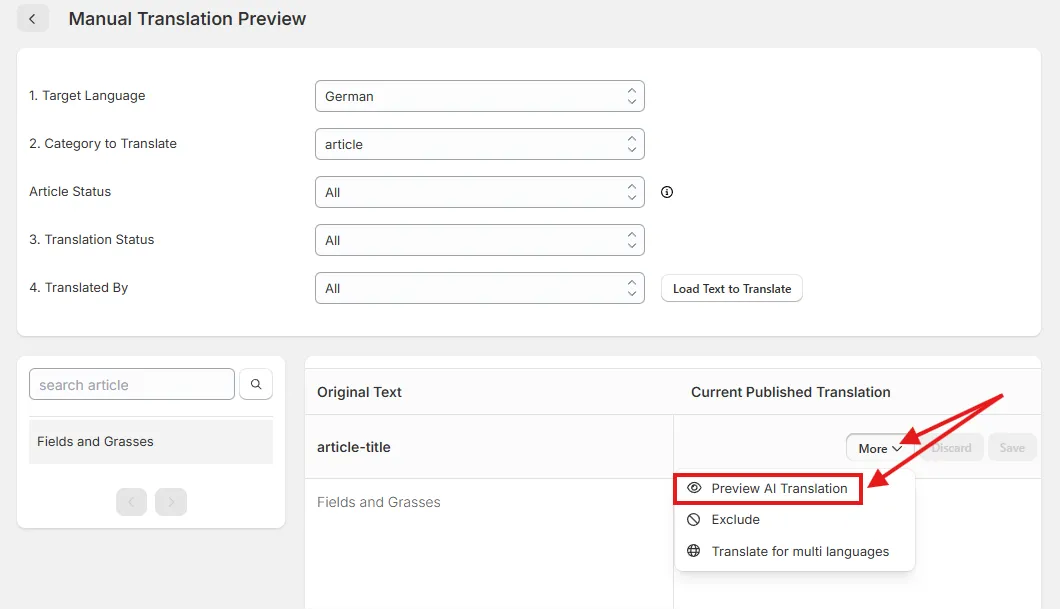
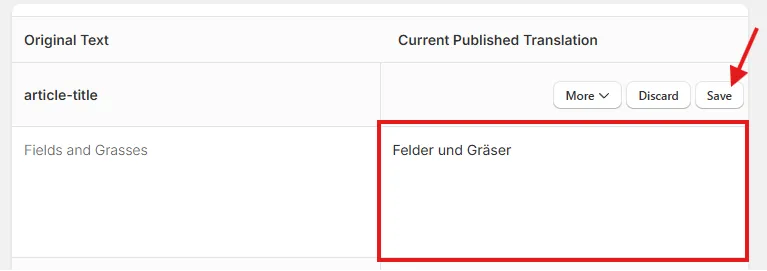
Each entry’s More menu now has a Preview AI Translation action that drops an AI draft into the editable box. Review the draft, then click Save to apply it. If the box already has text, a confirmation asks before replacing it.
Where to find it
- Go to Manual Translation and open an entry.
- Click the More button.
- Select Preview AI Translation.
The AI draft appears in the editable box. Review it, then click Save to publish the translation.
Scope & limitations
- Uses your shop’s existing AI engine, tone/formality, and glossary settings.
- Credits are debited at generation time — even if you don’t click Save.
- Out of credits shows the usual dialog.
- Cached or already-translated items are free.
If you have any further questions, please feel free to email us at help@hextom.com.
Was this article helpful?
Your feedback helps us improve our docs.
Thanks for the feedback!