
FAQs
How do I bulk edit Microsoft Advertising related product fields?
All Microsoft Advertising App fields are product metafields. These fields are used by the Microsoft Advertising app to sync your product data with Microsoft’s ad network, helping you reach more customers on Bing and the Microsoft Search Network.
The table below shows each field’s namespace and key. They can all be edited using the Bulk Product Edit app.
Field:
Namespace:
Key:
Value:
This is a custom product
msft_bingads
custom_product
true or false
Google product category
msft_bingads
bing_product_category
Age
msft_bingads
age_group
newborn, infant, toddler, kids, adult
Gender
msft_bingads gender male, female, unisex
Condition msft_bingads condition new, refurbished, used
Color msft_bingads color
Material msft_bingads material
Size msft_bingads size
Size system msft_bingads size_system AU, BR, CN, DE, EU, FR…
Size type msft_bingads size_type regular, petite, plus, big and tall
Brand msft_bingads brand
Manufacturer part number msft_bingads mpn
Custom Label 0 msft_bingads custom_label_0
Custom Label 1 msft_bingads custom_label_1
Custom Label 2 msft_bingads custom_label_2
Custom Label 3 msft_bingads custom_label_3
Custom Label 4 msft_bingads custom_label_4
Method #1: Filter based bulk edit
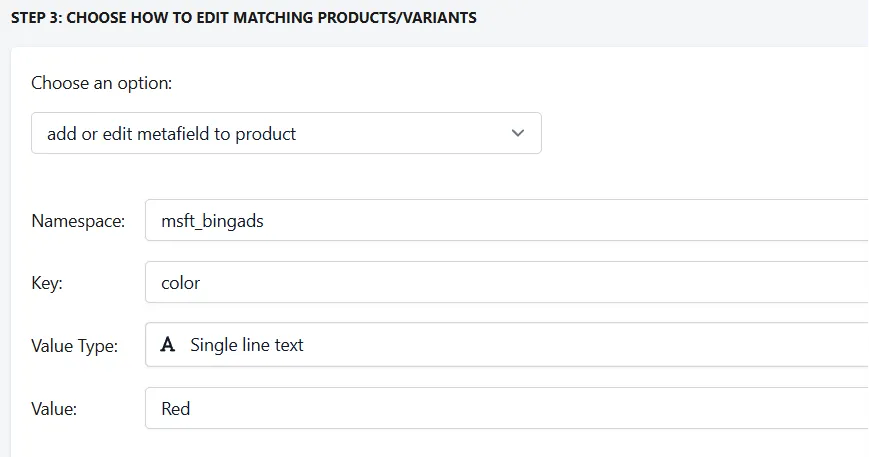
This method allows you to directly edit Microsoft Advertising fields within the app by filtering your products and updating the relevant metafield values.
For example, to edit the Color field, select Product Metafield as the parameter and map it to the corresponding column in your spreadsheet
Method #2: CSV file based bulk edit

Steps to edit Microsoft Advertising Attributes :
- Select the column of your spreadsheet containing the attribute you wish to edit
- Select Product Metafield from the list of parameters to update
- Specify the Microsoft Bing Shopping Attribute using the format: namespace.key
Example:
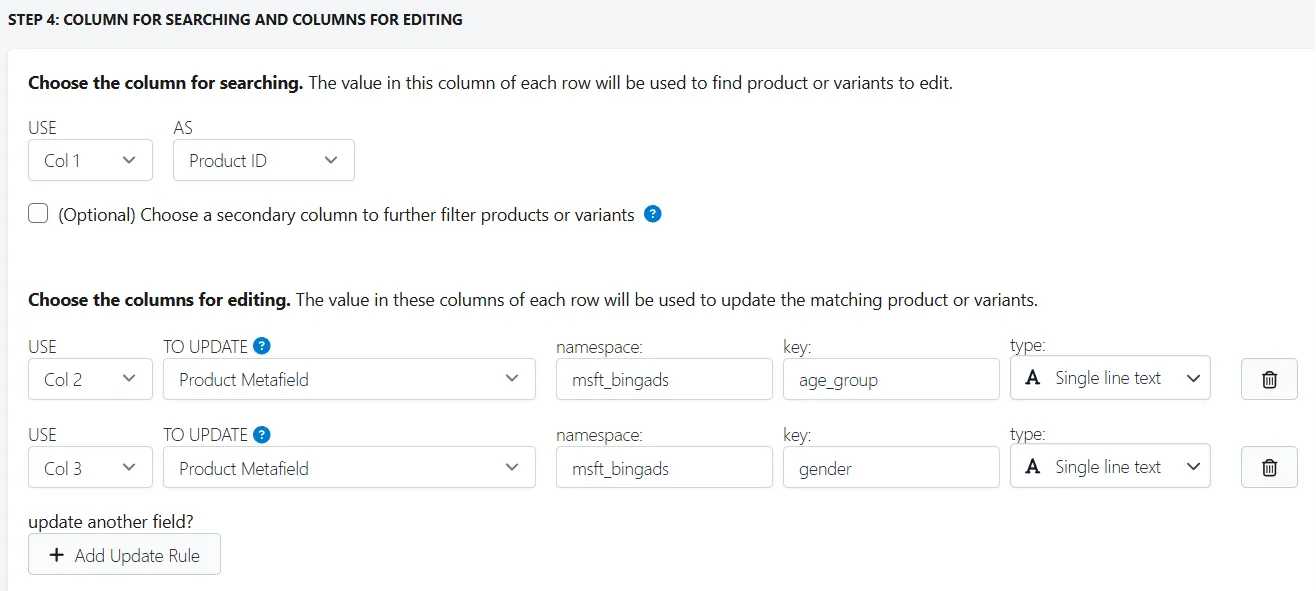
To edit the age_group attribute, you would write: msft_bingads.age_group
To edit the gender attribute, you would write: msft_bingads.gender
The screenshot below provides an example of how to edit these two fields.
If you have any questions or concerns, please feel free to reach out to us at help@hextom.com